
 Install


Written By
Dikshya
Finding a room in Nepal shouldn't feel like a full-time job, and with SajiloMandu's Room Finder, it doesn't have to be.
Whether you're a student relocating to Kathmandu, a working professional searching for a flat in Lalitpur, a landlord looking for the right tenant, or a traveler scoping out budget accommodation, SajiloMandu's Room Finder is built to serve you. This isn't just another listing board; it's a structured, multi-sided platform that connects room owners, room seekers, and professional agents all under one roof.
In this blog, we're going deep. Really deep. We'll walk you through every single feature inside the Room Finder from the different listing modes to the smart filter system, the interactive map view, and the listing creation process. By the time you're done reading, you'll know this tool better than most people who use it every day.
🏠What Is the Room Finder and Why Does It Exist?
Nepal's rental market has long been fragmented word-of-mouth, handwritten notices on poles, and a patchwork of Facebook groups. SajiloMandu was built to change that. The Room Finder is the centrepiece of the platform, bringing together hundreds of listings from across the Bagmati Province and beyond into a single, searchable, filterable, and mappable interface.
What makes SajiloMandu's Room Finder genuinely different is that it's not one-directional. Most rental platforms only let owners post listings and expect seekers to scroll. Here, both sides can post. A room owner can say "I have a room available." A seeker can say "I'm looking for a room in this area at this price." This two-way posting model combined with professional agents in the mix creates a living, breathing ecosystem rather than a static billboard.
The Room Finder page opens with a clean search bar, a cluster of smart buttons, and a grid of cards that load the most recent posts. Everything is designed to help you get to the right listing as fast as possible whether you're on a laptop in an office or scrolling on your phone from a pants pocket.
👥Three Listing Modes: By Owner, By User, and By Agent
This is the feature that sets SajiloMandu apart from virtually every other room-hunting platform in Nepal. Just below the search bar, you'll find four tab buttons: By Owner, By User, By Agent, and All. These aren't just filters they represent completely different types of people posting on the platform, with different intentions and different content.
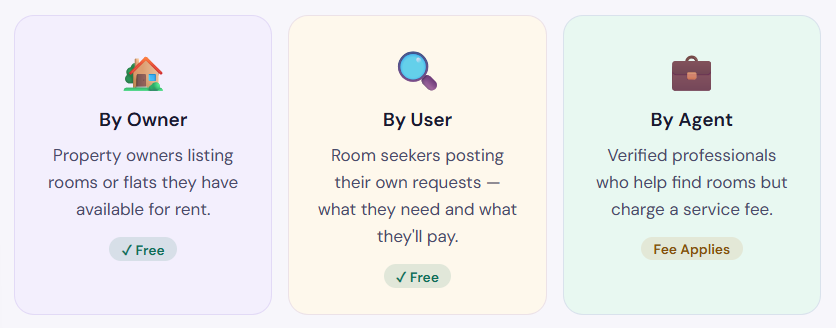
Let's explore each one in detail, because each tab has its own logic and its own value proposition.
🏡 By Owner - Rooms Posted Directly by Landlords
When you click the "By Owner" tab, you're seeing listings posted by the actual property owners themselves. These are the people who own the house, the flat, or the hostel, and they're posting to find the right tenant. No middleman. No commission. Direct contact.
In this view, you'll see listing cards showing the property name, a photo (or sometimes a placeholder), the monthly price in Nepali Rupees, the room/property type, the location (typically district and province), availability status, and a view count. Each card also shows the owner's name and how recently the listing was posted so you can immediately tell what's fresh.
Currently, the By Owner section shows around 26 listings on a typical browse but this grows rapidly as more property owners discover the platform. You'll find listings ranging from 1 BHK flats in Suryabinayak and 2 BHK apartments in Bhaktapur to single rooms in central Kathmandu. Prices span from under Rs. 10,000 to Rs. 25,000+ per month depending on location and furnishing.
One important thing to note is the availability status badge shown on each card it clearly says "Available" in green, so you're not wasting time messaging someone whose room is already gone. Listings also show urgency status (Urgent or Not Urgent), which tells you how quickly the owner wants to close the deal.
Pro tip for seekers: When browsing By Owner listings, check both the view count and the age of the listing. A listing with 2,532 views posted one week ago is getting serious traffic that room might go fast. A listing with 100 views from the same week is less competitive. Use this intelligence to prioritise who you contact first
🔍 By User - Room Seekers Posting Their Needs
This is where SajiloMandu truly flips the script on traditional rental platforms. The "By User" tab displays posts made by people who are looking for rooms not offering them. With over 863 listings in this category, it's actually the largest section of the Room Finder, showing just how many people in Nepal are actively searching for accommodation.
When a user creates a "Looking for Room" post, they specify what they're looking for: the area, how much they're willing to pay, what type of room they need (single, furnished, flat, etc.), and any special requirements. These posts show up as cards, each tagged with a yellow "Looking for Room" badge so it's immediately clear you're looking at demand, not supply.
Why does this matter? If you're a landlord browsing the platform, this section is pure gold. Instead of waiting for seekers to contact you, you can come to them. You'll see posts like "Need 1 single room near Bhaktapur for Rs. 6,000/month" or "Looking for a furnished single room in Kathmandu at Rs. 3,000/month." If your property fits, you reach out directly. No listing required on your end the seeker did all the work for you.
The By User section also features urgency levels (Urgent, Not Urgent, ASAP), which tells a landlord exactly how much time pressure the seeker is under. Someone marked "ASAP" will likely make a decision within 24–48 hours. This is powerful information for matching the right room with the right person at the right time.
The fact that the By User section has 863 listings compared to the owner section's 26 reveals an important market reality: demand in Nepal's rental market significantly outpaces organised supply. Thousands of people are actively looking for rooms but most landlords still rely on word-of-mouth or physical notices. SajiloMandu is working to bridge that gap, and the Room Finder is the primary tool for doing so.
💼 By Agent - Professional Room Hunters for Hire
The third mode is the "By Agent" tab, which represents a different kind of actor entirely: professional real estate agents or room-finding brokers who operate as intermediaries between owners and seekers.
Unlike the By Owner and By User sections which are completely free for all parties the By Agent section involves a service fee. Agents who register on SajiloMandu are required to include their fee structure in their profile or listing, making the cost transparent upfront. There are no hidden commissions or surprise charges after you've moved in. What you see in the listing is what you pay.
When you switch to the By Agent tab, the platform shows either individual listings or agent profiles (you can toggle between "Listings" and "Profiles" views on the right side of the results bar). If no agents have currently posted in your searched area, the page will show "No listings match your criteria" a clean, honest response rather than showing irrelevant results.
Who should consider using an agent? If you're relocating from outside Nepal, if you're in a specific high-demand area with limited visible listings, or if you simply don't have time to browse hundreds of posts, a verified agent can save you enormous amounts of time. They know the local market, they have relationships with landlords who don't post publicly, and they can negotiate on your behalf. The fee is the cost of that expertise.
SajiloMandu ensures that all listings owner, user, and agent are free to browse. The only cost involved is if you specifically choose to hire an agent for their services, and even then, their fee must be declared in advance on the platform. There are no hidden charges at any stage of using the Room Finder.
🔎The Search Bar - Finding Exactly What You Need
At the top of the Room Finder page sits a clean, prominent search bar with placeholder text: "Search by city, state..." This is your starting point if you already have a location in mind. Type "Kathmandu," "Lalitpur," "Bhaktapur," "Thimi," or any neighbourhood name across Nepal, and the platform will instantly surface listings relevant to that location.
The search bar works in combination with the active tab. If you're on "By Owner" and search for Kathmandu, you'll see only owner listings in Kathmandu. Switch to "By User" and search the same term, and you'll see all the seekers looking in Kathmandu. This tabbed search functionality is extremely practical it means you can zero in on exactly the right category of listing without ever needing to wade through irrelevant results.
The search also appears inside the listing type dropdown labelled as "By Owner," "By User," or "By Agent" which sits right next to the search bar. This dropdown gives you a second way to switch between listing modes, right at the search level, making the interface incredibly intuitive even for first-time users.
Power user tip: If you're not sure about a specific neighbourhood, search by the broader district name (like "Bagmati" or "Bhaktapur"). Then use the Filters panel to narrow down by room type and price. This combination gives you the widest possible relevant pool before you start narrowing.
📝List Room - Creating Your Own Listing
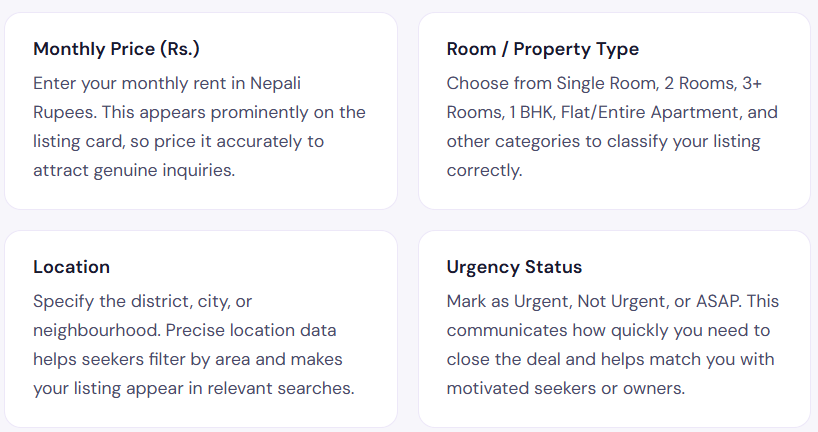
Just to the right of the search bar, you'll notice a "+ List Room" button. This is the gateway to creating your own listing — whether you're an owner posting an available room or a user posting a room-wanted request. Clicking it takes you directly to the listing creation form, titled "Create a New Listing."
The form is thoughtfully structured. The first question it asks is: "What are you posting?" - and gives you three options from a dropdown menu:
1. I Have a Room (Available) - Choose this if you're a landlord or property owner with a room or flat available for rent. Your listing will appear in the "By Owner" section.
2. I Need a Room (Wanted) - Choose this if you're a seeker posting your requirements. Your post will appear in the "By User" section as a "Looking for Room" listing.
3. I am a Verified Agent - This option is for professional agents who have been verified through SajiloMandu's verification process. Their listings will appear in the "By Agent" section with their fee structure disclosed.
After selecting what you're posting, the form asks you to fill in the Description field. There's even a built-in tip box that advises: "Include your contact number (e.g. 98XXXXXXXX) so seekers can reach you directly for faster responses!" This is a practical nudge that helps listings convert better — a listing with a contact number gets messaged faster than one without.
The description field encourages you to mention nearby landmarks, water supply, sun exposure, house rules, and any other details that help a seeker make an informed decision. The more specific your description, the better your listing performs.
Once submitted, your listing goes live on the platform and starts appearing in search results and the listing grid. You can manage, edit, or remove your listing at any time from your account dashboard. The whole process — from clicking "List Room" to having a live listing — takes under five minutes.
For room owners: A well-filled listing gets significantly more views than a bare-bones one. Listings that include accurate pricing, a clear description with contact details, a genuine photo of the room, and a precise location consistently outperform incomplete listings in SajiloMandu's search rankings.
⚙️ The Filter System — Narrowing Down to Your Perfect Match
One of the most powerful features of the Room Finder is the Filters panel, accessible by clicking the "Filters" button in the top toolbar. This opens a side panel with a comprehensive set of criteria that let you slice through hundreds of listings and surface only the ones that genuinely match your needs.
Here's a complete breakdown of everything available in the Filters panel:
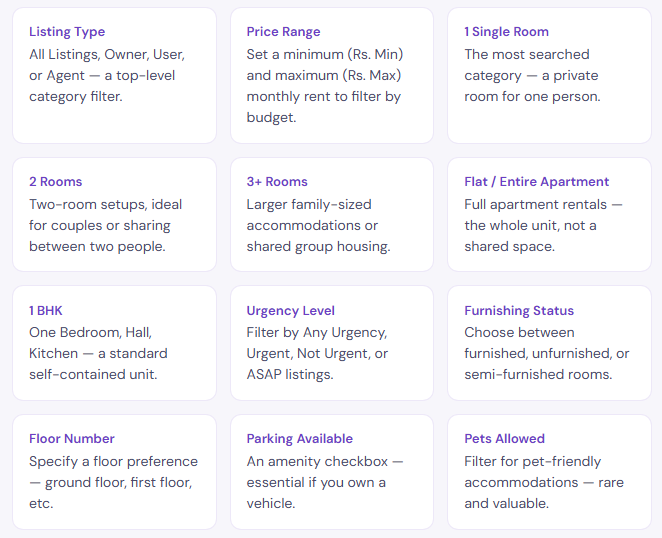
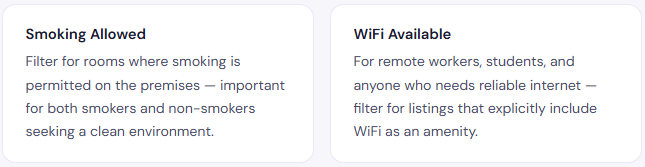
The filter panel is scrollable, suggesting there may be additional amenity options beyond what's immediately visible — including potentially filters for water supply, parking type, and proximity to landmarks. All filters stack together, meaning you can combine multiple criteria at once. For example: Furnished + Single Room + Under Rs. 8,000/month + WiFi in Kathmandu is a perfectly valid filter combination that would narrow the pool to exactly the listings that match all those requirements simultaneously.
There's also a reset button (the diamond-shaped eraser icon next to Filters in the toolbar) that clears all applied filters instantly, letting you start fresh without navigating away from the page. This small UX touch makes a big difference when you're experimenting with different criteria.
The Filters panel effectively turns the Room Finder from a general listing board into a precision search engine. A seeker who uses even two or three filters — say, price range and room type — will save significant time compared to scrolling through all listings manually. Start broad, then filter down. This is the optimal way to use SajiloMandu's Room Finder.
🗺️ The Map View - See Listings Exactly Where They Are
The final major feature in the Room Finder toolbar is the Map button. Clicking it switches the interface from the standard listing card grid to a full interactive map view — showing all available listings pinned at their real geographic locations across Nepal.
This is one of those features that seems simple but completely changes how you approach the room search. When you're looking at a grid of cards, location is just a text label — "Kathmandu, Bagmati Province." When you're looking at the map, you can see exactly which street the room is on, how far it is from your workplace, your college, or a bus stop, and whether it's in a neighbourhood that genuinely works for your daily life.
The map integrates seamlessly with the search and filters. If you've searched for "Lalitpur" and applied a Rs. 10,000–Rs. 20,000 price filter, the map only shows pins for listings that match those criteria. You're never looking at irrelevant data — the map is always a visual representation of whatever filtered results you're currently viewing.
For people relocating to a new city or district in Nepal, the map view is especially valuable. If you're moving to Kathmandu from outside the valley and you know you'll be working in Thapathali, you can zoom in on that area and immediately see all available listings within a walkable or short-commute distance. This saves days of back-and-forth messaging with owners about location details.
The map also works well in combination with the "By User" tab. If you're a landlord browsing the map in seeker mode, you can see geographic clusters of demand — areas where many people are actively looking for rooms. This is useful intelligence if you're deciding which of multiple properties to list first, or if you're a developer or investor thinking about where rental demand is highest.
🃏Understanding the Listing Cards - What Every Detail Means
Whether you're in grid view or just browsed back from the map, the listing cards are where most of your time will be spent. Each card is a compact information package, and knowing how to read them quickly can save you a lot of time. Here's what every element of a listing card tells you:
1. Owner/User Profile Photo and Name - Shown at the top of each card. This is the profile of whoever posted the listing. If they have a photo, it adds trust and familiarity. If they're using the default avatar, it's still a registered account with a name.
2. Urgency Badge - Shown next to the name. Says "Urgent," "Not Urgent," or "ASAP." This is one of the most practical signals on the card it tells you how motivated the lister is to close a deal quickly.
3. Time Since Posting - Shown in the top right (e.g., "5d," "1w," "6h"). Fresher listings are more likely to still be available. A listing posted 2 weeks ago may already be filled.
4. Property Photo / Carousel - The main image area, with swipe capability if multiple photos are included. Photos are your first real impression of the room — listings with real interior photos perform significantly better than those with placeholder or irrelevant images.
5. View Count - Shown as an eye icon with a number (e.g., 👁 2532). This tells you how many times the listing has been viewed. High view counts on recent listings mean strong competition — act fast.
6. Save / Favourite Button - The heart icon lets you save a listing to your favourites so you can come back to it later. Useful when comparing multiple options across a session.
7. Listing Title - A short description of the property, e.g., "1 BHK Flat in Balkot, new Thimi..." or "Need 1 single room near Bhaktapur." This gives the core identity of the listing.
8. Monthly Price - Displayed prominently in blue (for available rooms) or yellow (for Looking for Room posts). Shown in Nepali Rupees per month. This is the first filter most seekers apply mentally when scanning cards.
9. Availability or Intent Badge - Green "Available" badge for owner listings; yellow "Looking for Room" badge for user listings. Instantly distinguishes supply from demand.
10. Room Type and Furnishing - A line like "1 BHK • Unfurnished" or "1 Single Room • Furnished." Two critical data points in one line.
11. Location Tag - The district and province, e.g., "Suryabinayak, Bagmati Province." Clicking this opens the map view centered on that area.
Together, these eleven elements give you everything you need to make a first-pass judgment about a listing in under ten seconds. That's intentional design SajiloMandu's cards are built for fast scanning, so you can evaluate twenty listings in the time it would take to read one paragraph of classified ad text.
💡Getting the Most Out of Room Finder - By User Type
Different users come to the Room Finder with different goals. Here's how each type of user should approach the platform to get the best results:
🏡 If You're a Room Owner
Start by creating a listing in the "I Have a Room (Available)" category. Include real photos of the room even a phone photo in good light is better than nothing. Add your contact number in the description field. Set accurate pricing based on your area's going rates (browse the existing listings to calibrate). Mark urgency correctly if you need a tenant by next month, say Urgent. Then check the "By User" tab regularly to find seekers whose requirements match your room, and reach out to them proactively. You don't have to wait for them to find you.
🔍 If You're a Room Seeker
Use the filters heavily. Start with your budget range and room type, then add location via the search bar, then apply amenity filters if you have specific needs (WiFi, pets, parking). Toggle between "By Owner" and "All" tabs to see the full picture. Switch to the Map view to verify the actual location before you commit to visiting. Save listings you like using the heart icon, and compare them side-by-side. Also create your own "I Need a Room" post many landlords browse the By User section actively. Your post costs nothing and could bring the right landlord directly to you.
💼 If You're an Agent
Register through the verification process and make sure your profile is complete with your service areas and fee structure clearly stated. Transparency is your biggest asset on SajiloMandu seekers are more likely to engage with an agent who is upfront about costs than one who seems to have hidden fees. Use the "Listings" and "Profiles" toggle in the By Agent section to maintain both an active listing presence and a strong profile page. Respond promptly to inquiries the platform's view counts make it easy for seekers to see which agents are active and which are not.
🌟Why SajiloMandu's Room Finder Works for Nepal
Nepal's rental market has unique characteristics that most generic listing platforms fail to account for. Properties often don't have formal addresses. Landlords frequently prefer not to commit to long-term formal leases. Seekers often don't have a credit history or formal rental record. And the entire market runs heavily on trust, relationships, and local knowledge.
SajiloMandu's Room Finder is built with these realities in mind. The ability to include landmarks in descriptions accommodates Nepal's informal address system. The direct-contact model (no mandatory messaging through a gatekept system) respects the relationship-driven nature of Nepali rental transactions. The two-way posting model (owners and seekers both posting) reflects how transactions actually happen — often through mutual discovery rather than one-sided browsing.
The price ranges on the platform from Rs. 3,000 single rooms to Rs. 25,000+ flats reflect the actual diversity of Nepal's rental market. This isn't a platform skewed toward premium properties or luxury seekers. It's genuinely inclusive of students, labourers, young professionals, families, and everyone in between.
The platform's 4.9/5 average rating from its 15,000+ active users is a strong indicator that this approach is working. For a country where trusted digital platforms for real-estate transactions have historically been scarce, SajiloMandu is filling a real gap and the Room Finder is the most direct expression of that mission.
The combination of free listings (for owners and users), transparent agent fees, smart filters, map integration, and a two-way posting model makes the Room Finder a genuinely complete solution. No single feature makes it great — it's the ecosystem of features working together that creates real value for everyone who uses it.
Final Thoughts: Your Room is Out There
The Room Finder on SajiloMandu is more than a list of available rooms. It's a marketplace, a communication tool, a search engine, and a map all wrapped into one feature that anyone can use for free.
Whether you're a landlord with a spare room in Bhaktapur, a student arriving from Pokhara to study in Kathmandu, a young professional hunting for a furnished flat near Patan Dhoka, or a verified agent ready to help both sides of the market the Room Finder has something specifically designed for you.
Use the tabs to filter by who's posting. Use the search bar to focus on your area. Use the Filters panel to eliminate anything that doesn't fit. Switch to Map view when you want to understand the geography. Save the listings that appeal to you. And don't forget if you're a seeker, post your own listing too. Let the landlords come to you.
The room you need is almost certainly already on SajiloMandu. The only question is how quickly you find it.
Discussion
Join the conversation
Login to post comments and interact with the community.
No comments yet. Be the first!